

What it senses
Omaya reads the signals your building already emits, plus whatever you choose to add. Nothing here requires an app on anyone's phone.
People and assets
Anonymous by default; identified only where you deliberately bind a tag to a person or asset.
-
Bluetooth tags — staff, contractors, trolleys, equipment
-
Radar and presence sensors — headcount in a room and where in it, no identity
-
Door counters — entries and exits at a threshold
-
Unrecognised devices — counted as passing footfall, never identified
Environment
Conditions that decide whether a space is usable, comfortable and compliant.
-
Temperature and humidity
-
Noise level
-
Air quality
-
Leak and supply-level sensors
Building systems
The equipment already installed, brought into the same picture as everything else.
-
Energy meters, down to a single circuit
-
Switches, actuators, lights, air-conditioning and blinds — read and controlled through the smart-home bridge
-
Buttons, panic buttons and call points
-
Gateway health, battery and signal strength
-
Room bookings from your Google or Microsoft 365 calendars
Signals arrive over Bluetooth, Wi-Fi, Matter and LoRaWAN, and over wired links where the equipment provides one. Device families are decoded individually rather than reduced to a lowest common denominator, so a counter reports counts and a meter reports consumption.

What it works out
Raw signal is not an answer. Between the sensor and the report, Omaya resolves where something is, how long it stayed and what that means for the space.
Position
Three methods, chosen per venue by what the site can actually support.
-
Presence — which zone heard it best
-
Triangulation — a position from three or more anchors
-
Fingerprinting — matched against a surveyed signal map
Stability
A device on a boundary should not flicker between two rooms all afternoon.
-
Smoothing across successive readings
-
Hysteresis before a zone change is committed
-
Cross-floor penalties so a floor below cannot claim a device
-
Stairs, lifts and escalators modelled, so a path between floors is a real path
-
One zone per device per period, never counted twice
-
Radar checked against a known tag, so the coverage of a sensor is measured, not assumed
Meaning
Derived measures, computed continuously rather than at report time.
-
Dwell — how long a stay lasted, bucketed
-
Occupancy against a zone's capacity
-
Return behaviour — first seen versus coming back
-
Forecast occupancy from observed pattern
-
Habit — where each person usually is, and when each room is usually used
-
Anomalies — a device that broke its own reporting pattern, scored and deduplicated


What it reports
Twenty-eight report types, each answering one question. Grouped here by the question rather than by where they sit in the menu.
Who was here, and where
-
Devices detected — distinct devices per space and day
-
Zone detection heatmap — the same, shaded on the floor plan
-
Zone presence — where time was actually spent
-
Sensor trail — zone-by-zone history for one device or entity
-
People count — live headcount, from counters, radar or tags
-
Room usage map — where in a room people actually stand, from radar
-
Movement flow — which zones feed which, and in what order
-
Enter / exit — crossings at a threshold
-
Gender and entry — where a counter reports it
How long, and how often
-
Dwell time — stays bucketed by duration
-
Device returns — first seen versus returning, by interval
-
Last 24 hours — the day so far, live
-
Distance — separation between devices over time
-
Zone compare — two spaces side by side
-
Compare — any period against another
-
Space utilisation — every zone against its capacity, ranked
-
Impact analysis — what changed after an event you mark
Is the estate healthy
-
Device status — online, stale, offline
-
Battery — level and projected replacement
-
Environment — conditions and threshold breaches
-
Button press — call points and request buttons
-
Alerts — what fired, when, and what followed
-
Webhook dead letter — outbound deliveries that failed
Prove it, and take it away
-
Compliance — evidence against a required standard
-
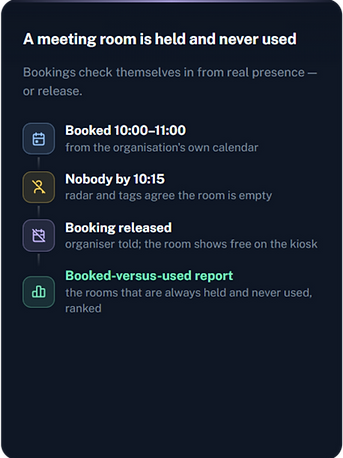
Meeting room — booked against actually used
-
Custom report builder — pick the table, columns and filters
-
Ask in plain language — describe the report, get the table and chart
-
Export — scheduled delivery to inbox or storage
Every report filters by location, venue, zone and date range, converts timestamps to the site's own timezone, and exports to CSV. Readings that could not be placed in a room are attributed to their venue rather than dropped, so a total never quietly loses rows.

What it does without being asked
A rule watches a measure, decides whether a condition holds, and acts. Fifteen measures can be watched, combined in a condition tree with and/or groups, time-of-day and day-of-week windows.
What a rule can watch
-
People count, enter count, exit count, zone density
-
Dwell time, home-zone status
-
Temperature, humidity, noise, air quality
-
Distance between devices
-
Battery level, device status, signal strength
-
Button pressed, and any custom field you define
What it can do about it
-
Notify by email, SMS, WhatsApp or Telegram
-
Raise a job in your maintenance system
-
Call a webhook, with retry and a dead-letter trail
-
Switch lights, air-conditioning, blinds or any device the smart-home bridge exposes — any service, any entity, targeted by the rule that fired
-
Escalate if nobody acknowledges
Rules can be tested against real history before you arm them, so you find out what a threshold would have done last month rather than next month. The assistant's daily review proposes rules too — you accept one and it opens pre-filled in the rule editor.
What it thinks about
The assistant works from what the platform already knows — every zone, device, rule and reading of one organisation — and is built to explain and propose rather than to act on its own.


OAIA — the operations assistant
Switched on per organisation from the A.I Model card; off by default.
-
Heartbeat every 2, 4, 6, 8, 12 or 24 hours: gateways offline or weak, ingestion gone silent, batteries, devices off their pattern, environment off baseline
-
Speaks only on change — new, escalated or cleared — and tells every administrator
-
Daily review (1, 2, 3 or 7 days): proposes rules, safety and comfort improvements, configuration fixes — conditioned on sense, such as occupancy before comfort
-
Findings acknowledged, snoozed, reopened or marked won't-fix; cleared ones hidden but kept
-
Chat that knows the tenant, the clock and the asker's role; /compact and /new keep it cheap
-
Approved actions it can draft — venue hours, zone capacity, a rule on or off, a device's zone, finding and suggestion states, plus each app's own — applied only by a person with the permission, once
Autopilot (beta)
The only way the assistant ever changes anything without a person clicking Apply. Off by default.
-
Three switches: the platform makes it available per organisation, the organisation picks Off / Shadow / Act, and turns on tiers — Draft (create proposed rules switched off), Configure (a capacity, a venue's hours, an unassigned device's zone), Operate (cooling on for a hot, occupied room; fans for stale air; lights for people in the dark or a zone with an open critical incident; everything off after the radar says a room has been empty ten minutes or the venue has been closed half an hour with nobody counted)
-
Limits in code: three actions per heartbeat, twenty a day, an hour before touching the same thing again, never flipping a device back within thirty minutes, setpoints inside 20–28 °C; every action listed with Undo; an undo pauses that kind for a day, three in a week drop it to Shadow
-
Its list is fixed and reversible; none of the apps' actions above is on it, however the switches are set
-
Switching it to Act, or making it available to an organisation, asks for confirmation that it is beta and can get one wrong
One assistant, every app
Each app you switch on plugs into the assistant; an app you have not switched on is never mentioned.
-
Hears: security incidents and judgements; bookings beside the hours a room was really used; work orders, assets and their service dates; every toilet's score, cleans and SLA breaches; kilowatt-hours beside occupancy and after-hours draw; connector health and webhook deliveries; visits and hosts; compliance verdicts and calibrations; drills and who was missing
-
Says: each app's week goes into the daily review with its own gaps, and its stalls become heartbeat findings — an incident nobody acknowledged, a calendar that stopped syncing, an urgent order nobody took, a dirty toilet with nobody sent, a bridge that stopped answering, a drill overdue
-
Proposes: whitelist a person or set armed hours; release a no-show booking, tune automatic release, make a room bookable; open, re-prioritise or cancel a work order; dispatch a clean, set a toilet's target or trigger; re-send or pause a webhook; run a compliance assessment or switch a profile — all approve-then-apply
-
Never: closes an incident, books or cancels a meeting, marks work or a clean done, edits a standard, touches a shift, changes an endpoint or a key, or starts, ends or marks a roll call
-
Every app's settings page carries Ask OAIA, and a record — an incident, a booking, a work order, a toilet, a verdict, a drill — can be put in front of the chat from the page it lives on
Security judgement
Inside the Security Watch app, for the guard on duty.
-
Every new incident gets a short assessment and a suggested first step from a fixed list
-
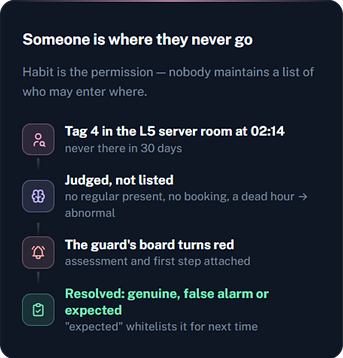
Out of habit: a person somewhere they have never been, or a room in use at an hour it never is and no booking — judged against 30 days of habit, so nobody maintains a list of who may enter where
-
Only an "abnormal" verdict becomes an incident; every verdict is recorded and shown to the administrator
-
Detection itself is deterministic and runs without the model
Where the fence is
The parts that let a customer's security team say yes.
-
One organisation per assistant, through read-only views with the organisation baked in
-
A database account that can only read those views, capped at 200 rows and five seconds
-
Secrets and credentials redacted before the model sees a row
-
No shell, no file system, no other tenant — by construction, then tested with injection, jailbreak and cross-tenant requests
-
Bring your own model key with no cap, or use Omaya's service within a monthly allowance set per organisation
-
The platform can withhold the assistant from an organisation; the organisation can switch it off







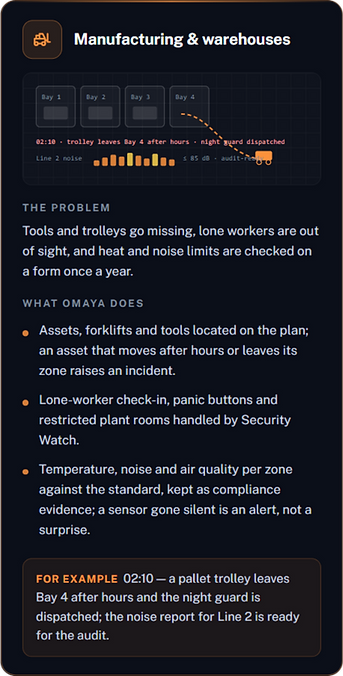
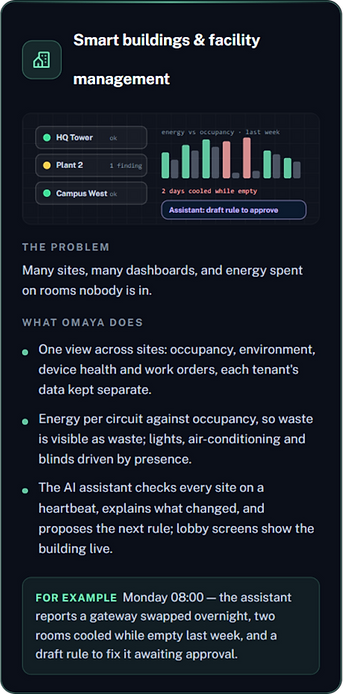
What it connects to
Bringing data in
Gateways and bridges speak to Omaya over whichever transport they support.
-
Message-broker, HTTP, TCP and UDP gateway endpoints
-
Smart-home bridge: read any entity it knows, and switch lights, climate and covers back through it
-
Twelve-plus gateway makes supported out of the box
-
Auto-discovery of devices a gateway starts hearing
-
Google and Microsoft 365 calendars for room bookings
-
Your identity provider for administrator sign-in, with group-to-role mapping
Sending it out
Alerts, exports and events, to where your team already works.
-
Email, SMS, WhatsApp, Telegram
-
Outbound webhooks with signed payloads
-
External maintenance and CMMS systems
-
Object storage for scheduled report delivery
-
Wall-mounted dashboards for a floor or lobby, including a live 3D floor plan
-
A public API with interactive documentation
Ready-made for a specific job
The platform underneath is the same. These are pre-built for problems common enough to be worth solving once.
Meeting rooms
Booked against actually occupied — find the rooms held and never used, and free them.
Facility requests
Button and app requests routed to whoever handles them, tracked to completion.
Visitors
Registration, check-in and check-out, host notification, and a visitor app the organisation brands as its own.
Washroom hygiene
Cleaning triggered by traffic rather than by clock, with supply levels and leak detection.
Lobby dashboards
A screen showing live occupancy, air quality or availability, without a login — including a live 3D floor plan.
Compliance
Evidence against a required standard, collected as it happens rather than reconstructed later.
Energy
Consumption per circuit against occupancy, so waste is visible as waste.
Roll call
Emergency muster: a snapshot of everyone on site, who has reached the gathering point, and who is missing.
Security Watch
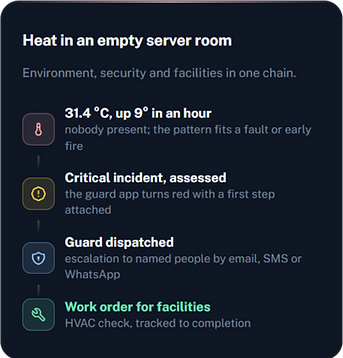
For the security team: armed hours, restricted zones, panic buttons, heat that looks like fire, coverage lost, and out-of-habit presence judged by AI. Guards get a phone app with a one-glance board; escalation goes to named people by email, SMS or WhatsApp.
Data centres
A data hall or comms room watched like the rest of the building: rack inlet heat, the power split, and the plant that keeps it running. Readings arrive from an edge gateway; each device is given a role once, in Setup. With a dark theme for the wall screen.
-
Power and PUE — facility, IT, cooling and other load live; each side falls back to what the site actually meters (IT meter, else the rack PDUs), and the card says which basis is in use rather than showing a clean number that is quietly estimated
-
The plant — UPS on battery, battery low and load; cooling units and fan walls stopped or supplying warm air; a fan wall's running, failed and installed fans, airflow and pressure; a generator that has not started while a UPS is on battery. A unit can be marked standby or in maintenance so it raises nothing it should not
-
Alerts that hold their nerve — one per subject, named for the worst rack; escalates past the critical limit or while still climbing, never steps down while open, clears only once settled — and a unit that goes quiet keeps its alerts and gets a "not reporting" one of its own
- Floor plan in 2D and 3D — racks coloured by inlet temperature and every plant unit drawn at its real size and angle, recoloured live by the alert it carries
-
Operating practice — 17 checks against recognised standards (thermal envelope, N+1 on cooling and UPS, fan-wall headroom, the 80 % rack-load rule, monthly generator test, PUE measurement category, sensor coverage, time to acknowledge) on the site's own readings; where it lacks what a check needs it says not measured rather than guessing
-
AI review — one call on the organisation's own AI allowance picks the two or three unmet checks to do first, reasoning about what is actually at risk here; any check opens straight into the OAIA chat
-
Trends — daily energy by IT, cooling and other, PUE against baseline and target, cost at your tariff, and a log of every time a UPS went on battery or a generator ran


How it runs
Separation
-
Each customer's data in its own store, not a shared table with a filter
-
Roles and per-page permissions
-
Every administrative action recorded in an audit trail
-
Retention windows you set, enforced automatically
-
Single sign-on per organisation; direct login can be switched off
-
A usage page per organisation: AI allowance, SMS, WhatsApp, email, webhooks, alerts — with failures listed
Keeping itself current
-
64 scheduled background tasks, from ingestion to report rollups
-
Gateway health watched continuously, offline raised as an alert
-
Forecasts and aggregates rebuilt on their own schedule
-
Failed outbound deliveries retried, then surfaced rather than lost
Reach
-
Interface in English and Malay, with six further locales in progress
-
Right-to-left layouts supported
-
Each site keeps its own timezone; reports convert to it
-
Works on a phone, a desk browser and a wall screen