


Your site, as a living model.
Omaya turns the people, devices, environment and space inside your site into one live picture — so you can run operations, keep people safe, and prove what is working without writing a single report by hand.
DEPLOYED ACROSS 8 INDUSTRIES · FIVE LANGUAGES · ONE PLATFORM · BUILT FOR SITES THAT NEVER STOP
12+
GATEWAY BRANDS
28
REPORT TYPES
9+
ACTION CHANNELS
5
LANGUAGES
Your data is everywhere.
Your answers are nowhere.
Every system in your building knows one thing and one thing only. Your access control knows who swiped at the door. Your cameras know what they can see. Your Wi-Fi knows what device is connected. None of them know what is actually happening, and none of them agree with each other.
CCTV sees faces, not flow. Access control sees the door, not the room. Wi-Fi sees the device, not the person carrying it.
When something goes wrong, you find out after the customer does — and the root cause lives across three different dashboards owned by three different teams.
Fire-drill headcount is a clipboard, a walkie-talkie, and a few people who remembered to swipe out.
You cannot tell which devices are deployed, which are charging, which are about to fail — until they do.
Compliance is a once-a-year scramble to stitch together screenshots, exports and someone else's notes.
Your team spends the morning copy-pasting numbers between Excel, the BMS, and the Friday email.
One live model, four streams of truth.
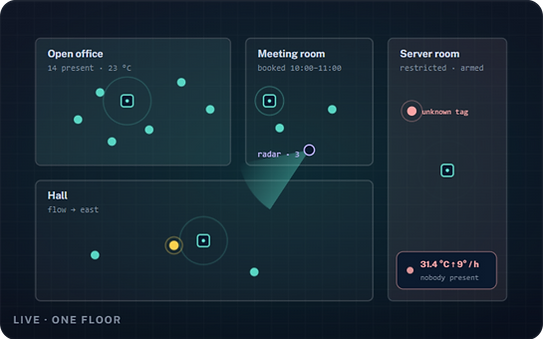
Omaya builds a continuously updated model of your site from the people, devices, environment and space inside it. Every minute. Every zone. Across every gateway brand you already run.
People
Every badge, every device, every visitor — positioned to the room.
Devices
Every gateway, every sensor, every asset — with status and location.
Environment
Temperature, humidity, noise, air quality — every minute, every zone.
Space
Every floor, every room, every zone — with how it is actually used.
Seven outcomes, one platform.
Each is something you can take to your operations meeting on Monday morning, in a number your finance team will recognise.
Track people and assets in real time
See who is where, what is moving, what has been sitting still too long. Replay the last hour, the last day, the last month. Search by person, by device, by zone, by tag.
Up to 90% faster locate-a-person response
See how a space actually gets used
Stop guessing which rooms are full and which are empty. Watch the heatmap. Compare this week to last week. Find the choke point you did not know was there.
Typical 15–30% improvement in space utilisation
Manage every device, gateway and sensor from one place
One inventory across every brand you run. Health, firmware, last-seen, battery, location. Get the alert before the device goes missing, not after.
Twelve gateway vendors, one screen
Respond to incidents before they become outages
Roll call, lone-worker check-in, panic-button escalation, after-hours intrusion, denied badge. The right person gets the page within seconds, in the channel they already watch.
Seconds, not minutes, to first response
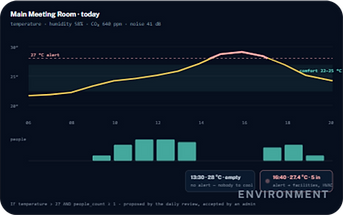
Keep every zone at the right condition
Continuous monitoring of temperature, humidity, noise, air quality. Threshold alerts, automatic adjustment, evidence-ready logs. Your HVAC bill and your auditor both thank you.
Typical 10–20% reduction in energy spend
Plan layouts, expansions and rounds from data
Dwell time, traffic patterns, peak hours, underused rooms. Make the case for the next investment with last quarter's numbers, not a gut feeling.
Twenty-eight built-in report types
Automate the boring follow-ups
If this, then that. Schedule a report when a zone crosses a threshold. Page the on-call when an asset has been offline too long. Hand the daily summary to the channel your team already uses.
Nine action channels, no glue code


.png)
The base platform does most of the work on its own.
The apps further down are optional add-ons. Tracking, monitoring and the operational-efficiency numbers above all run on the base platform with no app enabled at all.
Real-time tracking and monitoring
Every person, every device, every zone, every minute — surfaced on the live map, the dashboard and the audit trail the moment the data lands.
Operational-efficiency numbers
Staff coverage, asset utilisation, space occupancy, environmental exceptions. Generated for you, refreshed every minute, exportable to the format your team already reads.
Safety and emergency response, built in.
The same platform that watches your day-to-day operations becomes your single source of truth in an emergency. No separate system to keep aligned.
Emergency roll call
When the alarm sounds, the system gives you a real headcount from the badges and devices already in the building. Not a clipboard, not a roll call, not a prayer.
Access and intrusion events
Door forced, badge denied, after-hours motion, unexpected door open. Stream these into the alerting channel your team already uses — email, SMS, webhook, ticketing.
Lone-worker check-in
Set the interval, set the missed-response action. If a person in a high-risk area does not check in, the right team gets the page before the silence becomes an incident.
Panic-button escalation
One press, the right people. Configurable per site, per role, per shift. The escalation tree is yours, the page is automatic.
Three steps. No scripts.
The rule engine reads the same events your dashboard reads, applies the conditions you set, and fires the actions your team has already wired up. Every rule is auditable, every test runnable, every change signed.
1. Trigger
A device state, a sensor reading, a schedule, a badge event, a missed check-in, a threshold crossed, a zone entered or left. The platform already knows the events; you pick which ones to listen to.
Pick from 30+ event types
2. Condition
Thresholds, dwell times, comparisons, time-of-day windows, day-of-week windows, and / or groups. The condition tree is the part most teams get wrong — we have a tester for that.
Tested before it ships
3. Action
Send to email, SMS, webhook, ticketing, or any of the nine built-in channels. Hand the same event to multiple teams. Add a 30-second delay, suppress on weekends, throttle by site.
Email · SMS · Webhook · Slack · Teams · Telegram · LINE · MQTT · Custom
An assistant that reads the building, not a chatbot bolted on.
Omaya already knows every zone, device, rule and reading. The assistant works from that knowledge — inside your organisation only, read-only, and it proposes before it acts. Nothing leaves the fence.


OAIA — the operations assistant
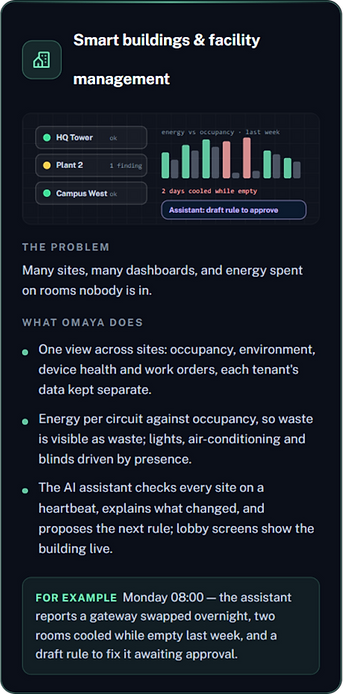
A heartbeat on your schedule walks the estate: gateways gone quiet, batteries about to fail, a room reading that broke pattern. It only speaks when something changed, and explains why it matters to the person running the building.
Every 2–24 hours · all admins told
A daily review with proposals
Once a day it looks at how the site is run and proposes rules, comfort and safety improvements and configuration fixes — sensible ones, like cooling a meeting room only when someone is in it. You accept, dismiss, or mark done.
Proposals, not surprises
Ask, then let it act
Ask in plain language — which rooms sat empty this week, why an alert fired. When the answer calls for a change, the assistant drafts the action; a person with the right permission applies it. No shell, no other tenant, no secrets.
Propose → approve → applied
Reports you can ask for
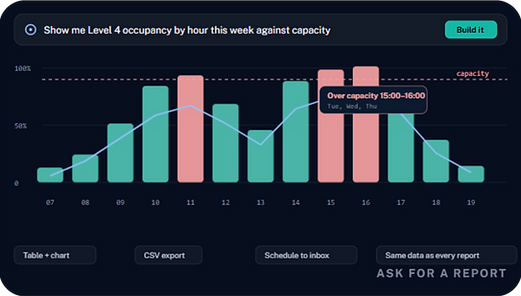
Describe the report you want and get the table and chart, built from the same data as every other report. Use Omaya's AI service within a monthly allowance, or bring your own model key with no cap.
Your key or ours · usage visible
One assistant across every app
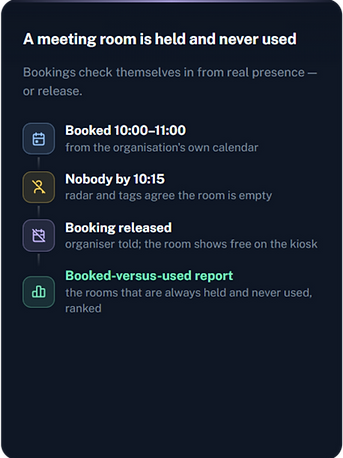
Security incidents, meeting rooms, toilets, work orders, energy, connectors, visitors, compliance, roll calls — each app you switch on tells the assistant what it sees, and the assistant answers for all of them in one conversation. It can propose the change each app would want — whitelist a cleaner after hours, release a booking nobody came to, dispatch a clean, re-send a failed webhook — and a person applies it. It never closes an incident, marks work done or runs a roll call.
Hears every app · acts only with approval
Autopilot (beta)
For organisations that want more: let the assistant apply the reversible part of what it proposes without waiting — cool a room that is hot with people in it, switch off what was left on in a room the radar says is empty, create a proposed rule switched off. Three actions per heartbeat, twenty a day, an hour before touching the same thing again, every action listed with Undo. Off by default; starts in a shadow mode that records what it would have done.
Reversible only · Undo on every action
What actually happens on a Tuesday.
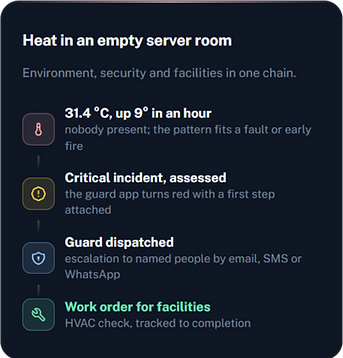
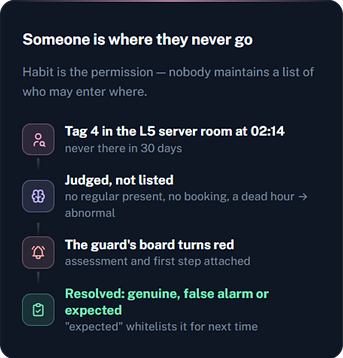
Nine things the platform does end to end, each one wired up in an afternoon. The sensor, the judgement, the person and the record are all the same system.





Built for the spaces people actually work in.
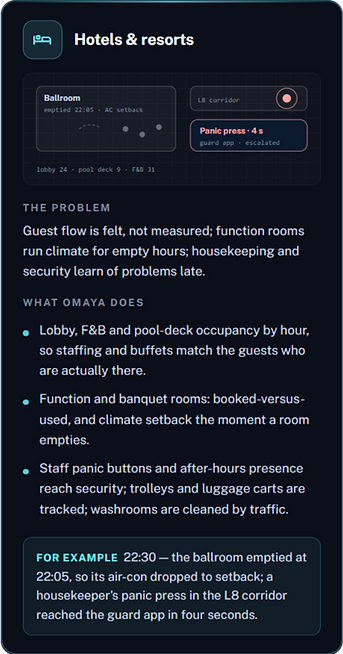
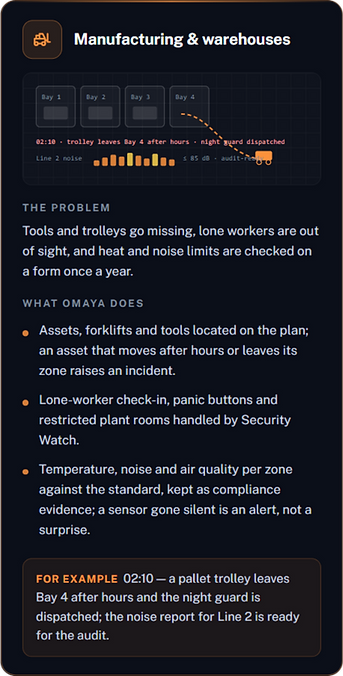
Ten kinds of place run on Omaya today. The same platform, the same rule engine, the same audit trail — configured for what each one actually needs.



Eighteen modules. Use any combination.
Every module is enabled independently. Most sites turn on a different subset on day one and grow from there. Nothing is locked behind a separate licence tier you have to ask for.
Dashboard
Live overview of people, devices, zones and exceptions. Your daily one-screen view.
Live Monitor
Real-time map of every person and device, with click-to-locate and replay.
Space Management
Floors, rooms, zones and their hierarchy. The graph everything else hangs off.
Floor Plan Editor
Drag-and-drop floor plan editor. Upload, calibrate, drop in zones and gateways.
Gateway Control
Multi-vendor gateway inventory, firmware, health and configuration in one screen.
Device Registry
Every sensor, badge and tag, with type, battery, last-seen and assigned person.
People & Assets
People and assets, with profiles, history and the right to be forgotten built in.
Analytics Reports
Twenty-eight built-in reports plus a query builder. Schedule, export, share.
Heatmaps
Live and historical heatmaps on the floor plan. See the busy rooms before they overload.
Rule Engine
If-this-then-that automation with the action channels your team already uses.
Audit Trail
Every state change, every override, every export — signed, searchable, exportable.
Mini-Apps
Marketplace of plug-in apps for specific workflows, enabled per tenant.
Connectors
Twelve built-in connectors: smart home, ticketing, HR, calendar, SSO and more.
System Config
Tenant settings, branding, time zones, data retention, role and permission scopes.
AI Reporting
Ask for a report in plain language; table and chart come back from the same data as every other report.
OAIA Assistant
Heartbeat anomaly checks, a daily review with proposals, and a chat that can act — with approval, inside your organisation only.
Platform Usage
What the organisation consumed this month: AI allowance, SMS, WhatsApp, email, webhooks, alerts — with failures listed.
Single Sign-On
Your identity provider signs your administrators in; group membership can decide the role; direct login can be switched off.
Six apps in the box, more in the marketplace.
Apps are per-tenant and per-user. The platform does not change when you switch one on — the data, the rules and the audit trail already include what the app needs.
Roll Call
Live muster at the assembly point, with the list of who is still missing and where they were last seen.
Facility Management
Asset register, work orders, preventive-maintenance schedules and a public request portal.
Compliance Reports
Evidence packs against ISO, OSHA, GDPR and other standards, exported on the cadence your auditor wants.
Meeting Room
Booking, live occupancy, calendar sync and kiosk display. Bookings check themselves in and out from real presence.
Visitor Management
Visitor registration, host notification, badge printing and watchlist screening.
App Marketplace & Per-App Access
Browse and install community-built extensions. Pin them to a site, a role or a user.
Security Watch
For the security team: armed hours, restricted zones, panic buttons, heat that looks like fire — and out-of-habit presence judged by AI, so nobody maintains a list of who may enter where.
Most sites are running by the end of week two.
Survey and deploy
A partner surveys your site, mounts the gateways, tags the spaces that matter, and brings up the floor plan. Most sites are physically complete in a day.
Connect and configure
Plug in the systems you already run — door access, HR roster, calendar, ticketing — through the connector hub. Configure the rules that match how your team actually works.
Operate and improve
The platform starts producing numbers, alerts and reports on day one. Your team tunes the rules, the floor plans and the dashboards as you go.
Five things we do that the alternatives do not.
Vendor-neutral by design
Twelve gateway brands, nine action channels, five languages, twelve first-party connectors. We do not lock you in — we lock the data down.
Multi-tenant, multi-site, multi-region
Run one site or a hundred, in one country or in five. Each tenant isolated, each user scoped, each role defined once.
Edge-resilient
Gateways cache locally and reconcile when the link is back. The site keeps working during a network outage. The audit trail records the gap.
Auditable end to end
Every state change, every override, every export is signed and searchable. The auditor's first question is already answered when they ask it.
AI that stays inside the fence
The assistant sees one organisation, through read-only views, with secrets redacted. It cannot reach the server, other tenants or anyone's password, and it applies nothing without a person's approval. We tested it with the attacks we would expect and it refused them.